Property managers and investors know renovations often face delays, mistakes, and cost overruns that eat into profits. Industry reports confirm that only half of construction projects finish on schedule, and 37% of projects are more than 20% over budget upon completion.¹
But these issues aren’t inevitable—they’re often symptoms of a flawed process.
This guide outlines a 4-phase framework for tech-driven renovation project management, helping you deliver projects on time and on budget.
Highlights
- Traditional renovation management often fails due to fragmented data, vague cost estimates, poor visibility, and disorganized closeouts, leading to delays, disputes, and budget overruns.
- A structured four-phase framework—planning, bidding, execution, and closeout—helps property managers deliver renovations on time and within budget through standardized processes and real-time oversight.
- Cloud-based tools like SiteCapture centralize project data, automate estimates, and connect field and office teams, eliminating manual errors and improving collaboration.
- SiteCapture enables accurate on-site estimates, digital scopes of work, live progress tracking, and photo-documented punch lists, giving managers full transparency from start to finish.
- Integrations with tools like QuickBooks, Salesforce, and DocuSign streamline accounting, scheduling, and reporting, turning renovation management into a unified, data-driven workflow.
Why traditional renovation management fails
When managing your construction and renovation projects, organizing, delegating, and tracking progress on your jobs can be difficult. Outdated methods often create friction, leading to common pitfalls that derail even simple home renovation projects. Identifying these weak spots is the first step toward fixing them.
Challenge 1: Disconnected and fragmented data
Renovation project management can be especially challenging if you’re away from the job site and your project data isn’t:
- Easily visible
- Consolidated
- Categorized
Relying exclusively on pen and paper, Excel spreadsheets, and endless streams of texts and emails creates information silos.
This data fragmentation is a systemic problem in construction.
According to Deloitte research, the average construction business manages 11 data environments. Almost half of those are there only for external stakeholder communication.
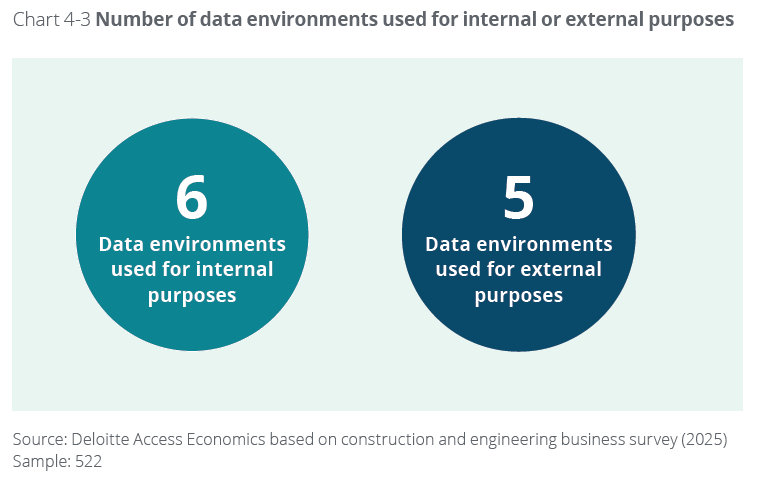
This messy approach leads to issues like:
- Confusion over bid versions stored in multiple email threads
- No reliable central source for project information
- Lost photos
Without clear, centralized, and accessible documentation, disputes are almost guaranteed.
Challenge 2: Inaccurate scope and cost estimation
Vague project scopes and rushed “guesstimates” during the bidding process are major causes of cost overruns. A 2024 Houzz study revealed that 39% of renovating homeowners exceeded their budget in 2023.
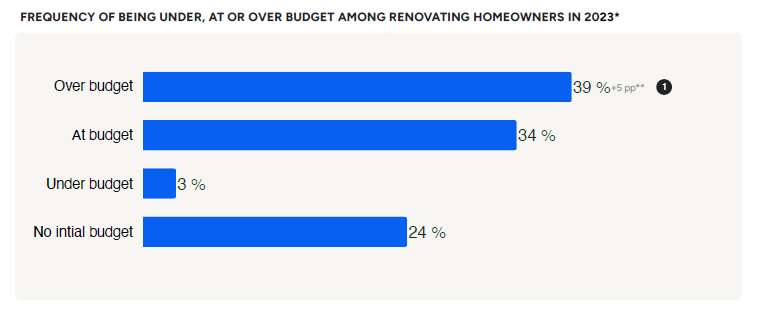
Two of the three leading causes were:
- Underestimated products or service costs
- A more complex project than expected
Proper budget management requires accurate initial data. Without a standardized method for cost estimation, two team members might scope the same unit turn or tenant improvement completely differently. This difference ultimately leads to:
- Unexpected change orders
- Blown project budgets
- Missed line items
This lack of precision significantly impacts the bottom line.
Challenge 3: Lack of real-time visibility
Once work begins, many property managers in the office struggle to know a job’s actual status. This lack of real-time visibility leads to:
- Inaccurate answers to property owners’ questions
- Slow responses to issues
- Wasted trips
Furthermore, many still rely on complex, dated software tools that aren’t mobile or cloud-enabled. These older systems often fail to bridge the gap between field and office, hindering managers’ ability to monitor progress efficiently.
Challenge 4: Inefficient project closeout
The final stretch of a renovation is often the most chaotic. You face:
- Disputes with contractors and designers over the quality of work
- Delays getting a unit rent-ready
- Disorganized punch lists
- And more
The result is a lack of visibility into the project, disorganization, frustration, and extra work, all leading to project delays and cost overruns.
A 4-phase framework for successful renovation project management
Overcoming these challenges requires structure.
A systematic approach using structured project management best practices ensures operational efficiency, consistency, and repeatable success. This consistency is especially crucial for property managers and asset managers handling multiple home remodeling projects.
This section presents a four-phase guide to planning renovations tailored for professionals managing multiple assets.
Phase 1: Planning and scope definition
Before boots hit the ground, define exactly what needs doing. Clear planning prevents scope creep and sets accurate project timeline expectations.
This critical first phase involves:
- Outlining clear project goals
- Creating the detailed initial project scope
- Setting realistic preliminary project budgets through careful budgeting and resource allocation

Goal setting is critical here: Are you focused on basic unit upgrades, improving energy efficiency with energy-efficient materials, or undertaking major structural work?
Now is also the time to research local building permit codes to avoid compliance delays later.
Phase 2: Bidding and vendor selection
With a well-defined scope, you can solicit accurate bids. This phase involves getting detailed proposals from your network of contractors, designers, or trusted trade partners. Using consistent templates and providing clear photographic evidence ensures apples-to-apples comparisons during the bidding process.
Documenting bids and vendor selection meticulously prevents misunderstandings and potential disputes later regarding cost estimation.
Phase 3: Execution and progress monitoring
This is the action phase. It involves:
- Ensuring everyone follows strict safety management protocols for effective risk management
- Conducting regular site inspections using a detailed quality control checklist
- Managing any necessary change requests formally
- Monitoring progress closely
- Coordinating trade partners
- Scheduling the work
In this phase, real-time visibility is non-negotiable. You need instant updates from the field to keep projects on track and address issues proactively.
Phase 4: Closeout and final turnover
The job isn’t finished when the final lighting fixtures are installed. The closeout phase involves:
- A thorough final walkthrough using a punch list
- Collecting all warranties and manuals
- Processing final payments based on documented completion
- Formally closing out the renovation project
For property managers, completing this phase efficiently is key to minimizing vacancy during unit turns.
How SiteCapture streamlines all four renovation phases
Transitioning to a unified platform for field ops management isn’t just about convenience; it’s about reclaiming valuable time. According to the Deloitte report cited earlier, construction leaders estimate they could save 1.5 days per week simply by having a more uniform data environment.
A cloud-based project management software like SiteCapture provides that uniformity. It manages the entire workflow—from initial estimate to final report—in one place.
Here’s how SiteCapture’s intuitive mobile app and web portal transform your renovation PM process.
Step 1: Create accurate, on-site estimates (Phases 1 & 2)
Accuracy starts in the field.
SiteCapture ensures your team captures everything needed the first time. Here’s a walkthrough of how to create on-site renovation project estimates with SiteCapture:
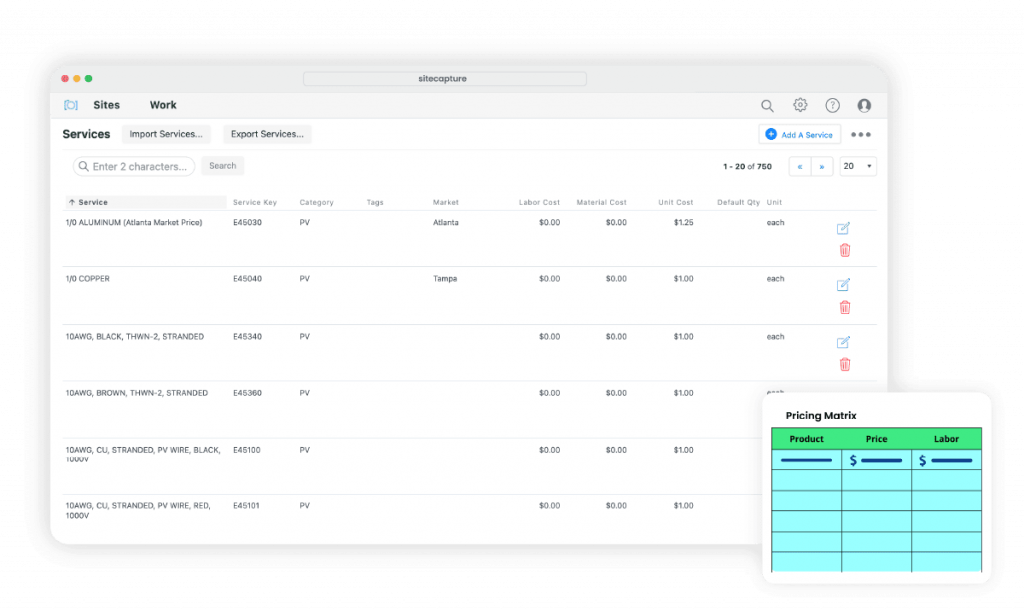
- Start by setting up your products, services, and costs in SiteCapture’s admin portal.
2. To start the estimating process, create a new project in the admin portal and assign it to your field team.
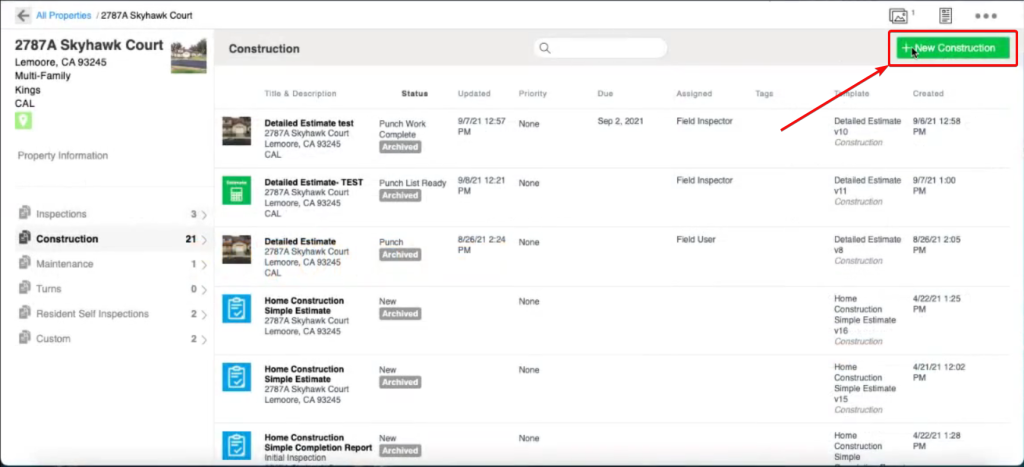
3. At the property site, your field team opens the SiteCapture app and taps the project to get started.
4. They go room by room in the Estimate menu and add all line items that need to be repaired, upgraded, or renovated following custom templates.
5. SiteCapture will calculate the estimate based on your company’s specific pricing set in step 1.
6. They can take before pictures of what needs to be done to compare with the after photos later.
7. Once done, they can sign the estimate and mark it as complete, syncing the data to the office instantly.
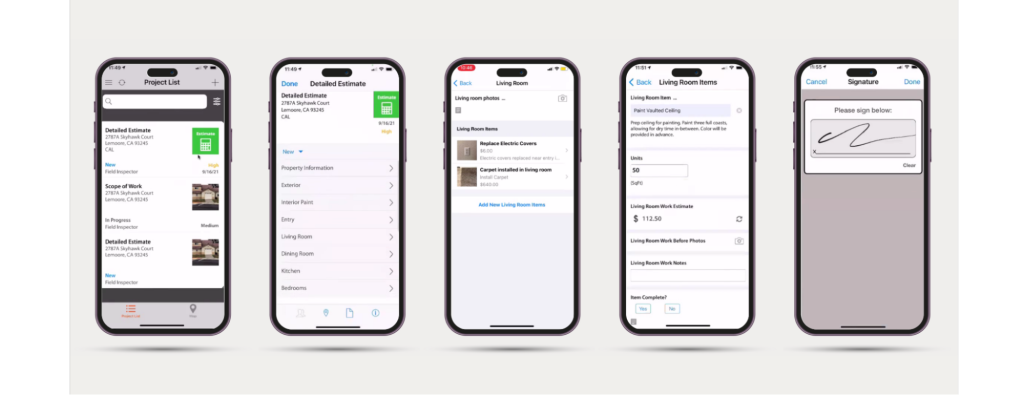
These features speed up the bidding process and help manage project budgets.
Step 2: Convert estimates to scopes of work (Phase 2)
SiteCapture lets you bridge the gap between estimate and execution seamlessly. Once the field team completes the estimate, back at the office, you can:
- Access the admin portal to review and edit the estimate your field team just completed
- Review all items, including on-site photos, to ensure nothing was missed
- Turn the estimate into a scope of work you can assign to your contractor with a single click.
After that, you can easily generate and assign work orders with a single click. This crucial step eliminates risky manual data re-entry and ensures the scope of work aligns perfectly with on-site findings.
Step 3: Track progress and manage quality (Phase 3)
The contractor can use SiteCapture and the scope of work to:
- Handle change requests with full visual context
- Manage the project through to completion
- Provide after photos of finished tasks
- Track all the items and tasks
All of it within the SiteCapture app.
This provides managers with essential real-time visibility into job status from anywhere.
Step 4: Manage punch lists and generate reports (Phase 4)
Finish strong with efficient closeout and professional reporting.
- The contractor can run through the punch process directly in the SiteCapture app, attaching photos as proof of completion
- The project manager reviews photo-documented fixes remotely and approves work instantly
Clear stakeholder communication is built in.
SiteCapture can also generate PDF reports at every step of the process, making it easy to report on your progress.
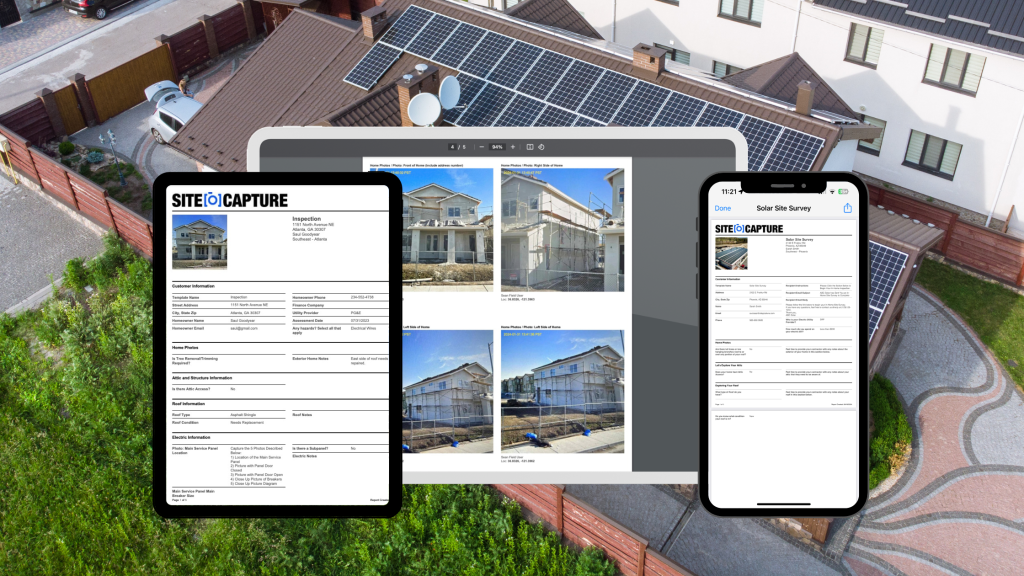
You can create branded “before and after” reports for property owners in minutes.
Step 5: Integrate with your favorite business tools to close the loop
Easily connecting data to your other business-critical apps closes the loop. SiteCapture integrates seamlessly with thousands of other cloud-based apps. You can fully automate and streamline your workflow by integrating SiteCapture with tools like:
- Google Calendar
- QuickBooks
- Salesforce
- DocuSign
- Dropbox
- Outlook
- And more
This connects field data directly to accounting integrations or your job costing software toolkit.
Stop managing chaos, start managing renovations
Stop letting preventable issues like delays, cost overruns, and disorganized documentation drain your resources. SiteCapture offers a simple, direct solution tailored for busy home improvement or house renovation project managers and better builders who just need to get jobs done faster and correctly.
SiteCapture provides the cost-effective solution you need to bring clarity, organization, and efficiency to every renovation project.
Ready to see how SiteCapture can transform your renovation project management? Schedule a personalized demo today!