
Send two crews to the same job, and you’ll get two different inspection records. One technician takes five clear photos and logs every serial number. The other technician might check three boxes, write “looks good,” and leave.
This inconsistency creates serious risks for field service compliance. Distributed teams can silently drift away from standard processes. Managers usually discover the gap only after a customer disputes an invoice, a warranty claim gets denied, or an inspector fails the site.
This guide outlines a simple approach to field service management (FSM) that keeps crews consistent. You’ll learn how to set up clear inspection checklists, enforce photo proof, and build solid audit trails without adding paperwork for your technicians.
Highlights
- Standardized checklists remove guesswork from compliance inspections and ensure crews complete every required safety and quality check
- Mobile-first workflows eliminate duplicate data entry, saving crews hours of non-billable admin time every week
- Digital validation blocks incomplete forms so technicians can’t skip required fields under tight schedules
- Clear photo standards provide indisputable proof of work to resolve billing disputes and warranty claims
What field service compliance covers day to day
In field service operations, compliance is more than legal theory. It’s practical. It means proving your crews did the job:
- Safely
- Correctly
- And according to contract terms
It also means that your business met external rules from regulators and governing bodies. Depending on your industry, these include:
- OSHA workplace safety rules and regulations
- National Electrical Code (NEC) standards
- Local building inspector sign-offs
- And property habitability laws
Failure to comply with these regulations carries real consequences. For example, missing documentation exposes your business to steep regulatory fines. Under the OSHA Civil Penalties Schedule, federal fines reach up to:
- Over $16,500 per first violation for serious citations
- Over 10X that amount for repeat infractions
Keeping clear records on every work order (work order management) protects your balance sheet from these liabilities. This day-to-day compliance across your field service operations covers four core areas:
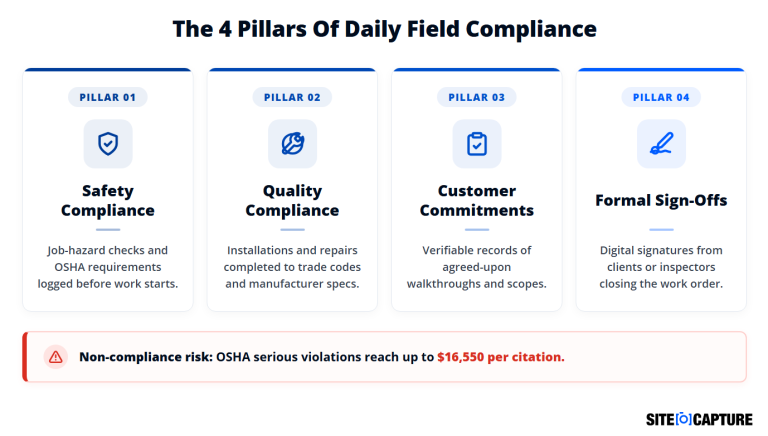
Safety compliance
Field service workers must complete and log mandatory safety checks before starting any physical work. Documenting lockout/tagout, PPE usage, and site hazards proves that the crew followed OSHA standards if an accident occurs.
Without a digital timestamp and photo proof, an inspector or insurance adjuster will treat unrecorded safety checks as if they never happened.
Quality compliance
Every service task must match:
- Manufacturer specifications
- Contract details
- Trade codes
This means recording precise data points (torque settings, voltage readings, line clearances, etc.) alongside clear photos of the finished work.
Clear quality records protect your business if equipment fails later and the manufacturer questions the installation.
Customer commitments
Contracts often require specific steps, such as:
- Pre-work property walkthroughs
- Tenant notifications
- Or site clean-up
Documenting each promised step with notes and photos proves your crew completed the agreed scope of work. This eliminates arguments over pre-existing property damage, prevents scope creep, and stops clients from withholding payment.
Inspection sign-off
Closing a job requires formal approval from the property owner, facility manager, or local building inspector. Relying on a verbal “looks good” leaves the door wide open for billing disputes and warranty confusion weeks later.
Securing a digital signature alongside municipal permit tags locks in job acceptance and lets the office invoice immediately.
Why compliance drifts across distributed teams
When service technicians work on separate job sites, consistency breaks down quickly. Without shared tools, each crew relies on personal habits.
Field operations drift for four common reasons:
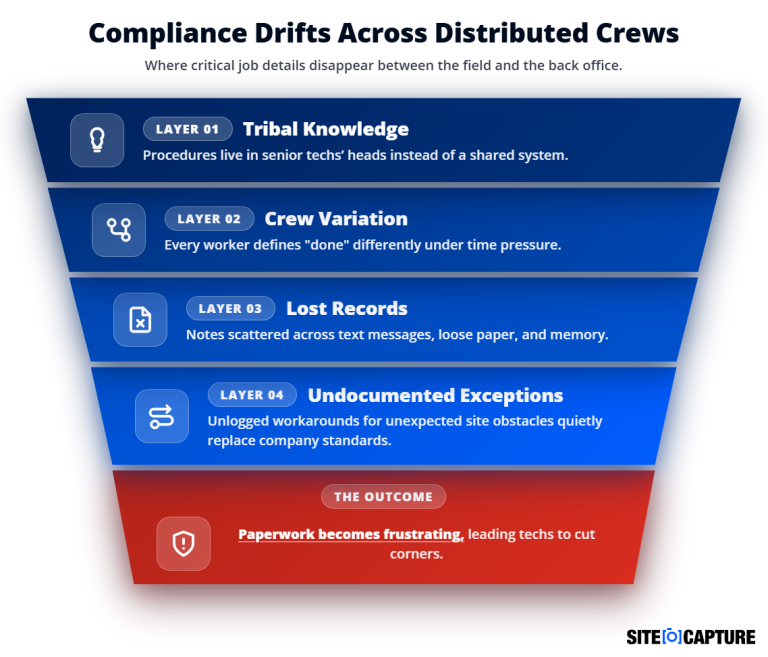
- Tribal knowledge: Senior technicians hold years of setup steps, safety habits, and equipment quirks in their heads. When that expertise isn’t built into standard digital checklists, newer technicians have to guess how to handle complex tasks. If a veteran worker leaves the company or calls in sick, critical quality standards leave with them.
- Crew-to-crew variation: Every technician brings different habits, experience, training, and personal standards to the job. One technician might double-check every wire connection, while another rushes through steps to beat traffic. Without a rigid template that dictates each step, your customers get uneven service quality, and the office receives mismatched records.
- Paper and text records: Informal notes sent through text threads, camera roll photos, or handwritten clipboards rarely make it back to central office files. Paper forms get smudged, torn, or lost under truck seats. Text messages often stay trapped on personal phones. When an auditor or client asks for proof months later, nobody can locate the missing records.
- Undocumented exceptions: Technicians regularly encounter broken parts, missing tools, or unexpected site layouts that force them to adapt. When a technician solves an obstacle without logging why they skipped a step, that temporary shortcut quietly turns into their regular routine. Over time, these undocumented field workarounds completely replace your service organization’s standards.
Heavy paperwork makes this problem worse. According to a Service Council report, over 30% of technicians rate paperwork and administrative overhead as their least favorite task.
When paperwork is slow and frustrating:
- Field workers cut corners to finish jobs on time
- Records scatter across text threads and paper clipboards
- Service managers are left with zero visibility into field operations
Standardizing your inspection checklists
Paper forms and loose notes create constant field service management challenges. A digital checklist guides your field technician through every step in the service process.
Standardized digital workflows improve service quality across your entire team. They help newer workers handle complex service tasks while giving the back office clean, reliable, real-time data.
What belongs in a checklist template
A practical checklist template keeps field service tasks clear and simple. Use direct language so every field service technician understands what to do immediately.
Every inspection checklist should collect four basic types of data:
- Job identifiers: Customer name, site address, work order number, and asset management details like serial numbers.
- Observable inspection points: Specific tasks like “check breaker torque” instead of vague prompts like “check safety.”
- Required photo proof: Specific photo requirements tied directly to critical inspection points.
- Sign-off fields: Digital signature boxes for both the technician and the on-site contact.
Making required fields genuinely required
Reminding technicians to complete paperwork doesn’t solve the problem. When a technician is behind schedule, they tend to miss optional questions.
Effective field service inspection software solves this by making critical fields technically mandatory. Technicians can’t close the work order or move to the next service appointment until they enter the required data and photos.
Beyond that, some tools, such as SiteCaptureAI, use artificial intelligence to accurately extract critical data from photographic and video footage. Using AI for field service management solves issues with manual data entry, which leads to average error and omission rates of 1.0% to 3.0% per field (source: AIIM).
Versioning templates as compliance requirements change
Even standardized digital inspection checklists age. Safety rules, building codes, and service level agreements change over time. When your rules change, your checklist templates must change too.
Your field service management software must track template versions automatically. This connects every completed inspection to the exact rules that were active on the day of the job.
Always roll out template updates across your entire team at once. Never update checklists in pieces. If you do, you’ll end up with mismatched and confusing service records.
Setting documentation and photo evidence standards
Photos provide the best proof of work performed in the field. But telling technicians to take photos without clear rules often leads to blurry, useless pictures.
Service leaders must define clear photo standards for every job type. Technicians need to know which items to shoot, who takes the photos, and what acceptable framing looks like. Using dedicated proof-of-work software helps establish and enforce a structured evidence system across your business.
The table below outlines the core photo standards you should require on every service call.
Job Stage | Required Photo Evidence | Operational Purpose |
Pre-Work | Existing property conditions, damage, and asset serial tags | Proves pre-existing damage to protect against claims |
In-Progress | Concealed components, wire runs, rough-in work | Proves work meets code before walls or panels are closed |
Post-Work | Completed installation, clean job site, new equipment tags | Confirms the technician finished the job correctly |
Sign-Off | Customer signature, signed permits, and inspector tags | Validates customer approval and supports billing |
Accountability makes the work consistent. Assign photo capture to a specific role on the crew. For example, on multi-person teams, make the lead technician responsible for logging asset data and service photos.
Set a simple quality bar for all images. For example, photos must be:
- Framed to show both the equipment detail and the surrounding work area
- Well-focused
- And well-lit
These standards are simple enough. However, even they can fail. Including example images of what good and bad looks like for each standard will go a long way.
Building an audit trail your team can actually produce
An audit trail of your service history provides proof of your service delivery. If a customer, inspector, or equipment manufacturer questions your work, you must produce detailed service records fast.
An audit trail should not require digging through paper folders or searching email threads. It should generate automatically as technicians complete their regular field service tasks.

A complete audit trail requires five basic elements:
- Timestamped records: Automatic dates and times locked to each entry that can’t be edited later.
- GPS confirmation: Location stamps confirming the worker was on site when logging the record.
- Fast export options: Searchable records that convert into a clean PDF report with one click.
- Technician attribution: The exact name and profile of the technician who entered the data.
- Exception logging: Clear notes explaining why the technician skipped or changed a step.
Clear documentation protects your business during formal contract disputes. According to a recent Arcadis report, the average commercial dispute in the construction industry costs $56.0 million and takes 12.2 months to resolve. Having exportable, timestamped records:
- Avoids these lengthy, expensive disputes
- Protects your business’s cash flow
- Shuts down false claims
- Speeds up payment
Rolling out standards without slowing technicians down
Technicians resist new systems if the tools slow them down. Operations leaders must therefore introduce new standards in stages. Introducing them all at once will only frustrate field crews.
Start by testing your new inspection checklists with a small pilot crew. Gather their direct feedback, remove unnecessary questions, and fix confusing steps before rolling out the tool company-wide.
Use mobile tools built for how technicians actually work in the field. Pick a mobile app that works offline and saves photos quickly so technicians can move between tasks without waiting on slow screens.

Using FSM software can also help you root out duplicate data entry completely. Technicians should enter equipment serial numbers and customer details once, and the software should automatically populate:
- Inventory management records
- Inspection checklist
- And the work order
Remember, manual paperwork burns money. An average of 4.5 hours of weekly paperwork per technician burns 36 hours across an eight-person crew. That wastes roughly $53,660 annually in non-billable labor, based on U.S. BLS average wage data.
A mobile platform like SiteCapture eliminates this administrative waste. Technicians capture data quickly, and the office gets organized safety and compliance records instantly.
Making compliance consistent across every crew
Consistent compliance doesn’t come from handing out thicker company policy binders. It comes from giving technicians simple mobile checklists with required fields they can’t skip.
Standardizing your field documentation:
- Delivers better service quality to customers
- Protects your business from liability
- And simplifies inspections
Schedule a SiteCapture demo today to see how our field service management solutions help your crews complete jobs faster and stay audit-ready.
FAQ
What is field service compliance?
Field service compliance means confirming and documenting that field work meets safety rules, trade standards, and contract agreements. It uses standardized checklists, timestamped photos, and customer sign-offs to verify that technicians completed jobs correctly.
How often should inspection templates be updated?
Update templates whenever safety regulations change, equipment manufacturers update installation specs, or client contracts change. Review your templates annually to remove outdated questions and keep field workflows fast.
What is the difference between a checklist and an audit trail?
A checklist guides a technician through specific tasks during a single job. An audit trail is the permanent, searchable record created from completed checklists, photos, timestamps, and signatures over time.
Who is responsible for compliance documentation on a distributed team?
The lead technician on site is responsible for completing inspection checklists and taking required photos. Service managers are responsible for reviewing submissions, updating templates, and maintaining complete records.