A property manager disputes an invoice in one job. In another, an inspector fails an installation. Your team completed both jobs correctly. However, their word alone can’t settle a contested bill or satisfy an inspector.
Without a standard way to verify tasks on site, customer disputes, payment delays, and repeat truck rolls follow. Manual tracking fails when proof stays trapped on personal devices.
Modern field proof-of-work software solves this operational breakdown. It gives crews a structured workflow to capture verified field records before leaving the site. This guide explains what counts as defensible proof, how to assemble it, and how to protect your margins.
Highlights
- Verified documentation speeds cash flow: Structured job packages cut payment turnaround times, stop chargebacks, and simplify crew coaching.
- Tamper-resistant metadata protects revenue: System-locked GPS data and timestamps prove exactly when and where execution occurred.
- Disorganized records drain billable capacity: Searching camera rolls and paper forms wastes billable technician hours every week.
- Single photos fail alone: Defensible proof binds visual, temporal, and spatial data into one unified job record.
What proof of work means in field service
In field service, proof of work (PoW) means verifiable evidence showing that a technician completed a physical task to exact specifications. It provides practical, physical verification of completed labor.
It’s more than an isolated photo or a signed paper sheet. True proof of work connects visual, temporal, and administrative data into a single structured record. It confirms:
- What happened
- Who did the work
- When it took place
- And where it occurred
Proof of work in field service is distinct from a blockchain proof-of-work consensus mechanism. The former validates digital ledger transactions.
In the field, PoW serves multiple industries and use cases:
- Solar installers use it to confirm that torque values, conduit runs, and inverter wiring match engineering designs and safety codes.
- Property managers use it to verify that unit turns, appliance repairs, and punch lists meet standards before tenant move-in
- Operations managers, trade contractors, and QA/QC directors also rely on this verification daily
Verification matters more today due to distributed crews, subcontractors, and remote clients who rarely visit job sites. At the same time, state laws and regulatory mandates now hold property managers and trade contractors to stricter evidentiary standards. Undocumented repairs create legal and financial exposure across every trade.
For example, under California AB 2801 Bill Text, enacted in September 2024, deductions from tenant security deposits require full before-and-after photo documentation. This law means that proof of work in property management is no longer optional. It’s a compliance requirement.
The six evidence types that make up a proof-of-work record
A defensible record can’t rely on a single data point. A client can easily dispute an isolated image or an unverified checkbox. Field proof-of-work software binds six distinct evidence types into a single file to confirm completed work.
Evidence Type | What It Proves | What It Can’t Prove Alone |
Photos | Visual condition of work at completion | Time, GPS, or lack of staging |
Timestamps | Chronological sequence and task duration | Location or linked job ticket |
GPS Data | Physical crew presence on site | Craftsmanship or task completion |
Technician Notes | Qualitative context and field measurements | Timeliness or lack of memory bias |
Checklists | Required steps addressed in sequence | Craftsmanship or task quality |
Job Records | Administrative link between labor and billing | Unaltered field execution |
Photos
Photos show the visual condition of the work at completion. Clear before-and-after photos prove trash was cleared, surfaces were prepped, or equipment was mounted correctly. They document physical reality better than written notes.
Despíte the above, photos alone can’t prove where or when they were taken. Anyone can download older images or stage shots to hide shortcuts. That said, you can improve field service documentation by establishing firm photo documentation standards.
Timestamps
Timestamps track arrival, task execution, and departure times. They verify labor hours for billing accuracy. They also confirm compliance with client service level agreements (SLAs).
Timestamps are an essential part of all PoW records. However, a timestamp can’t prove where your team was or the quality of the work. A time entry only confirms that an entry occurred at a given minute. It must link directly to a verified work ticket to carry weight.
GPS and location data
GPS coordinates confirm that a technician was physically present at the job site. Location tracking provides geographic verification for every site visit. It eliminates client claims that a crew skipped a scheduled appointment.

Location data alone only proves your team was there. Combined with timestamps, it confirms when they were there. But without photos or other evidence, you can’t assess or prove quality or scope completion.
A worker can remain on site without performing the required maintenance. Geotagging and timestamping photos enable GPS photo documentation that’s much harder to dispute.
Technician notes
While a photo can say a thousand words, it doesn’t always capture the nuance of technical observation. Technician notes provide the qualitative context that checklists and photos miss. Technicians use notes to:
- Record diagnostic measurements
- Document pre-existing damage
- Describe site obstacles
- And more
They explain why a crew made specific field adjustments. Notes lose value when written after leaving the property. In these circumstances, they can suffer from memory gaps and invite billing challenges. Recording notes on site with the proper software solves this issue.
Checklists
Digital checklists are one of the best ways to collect field data. They:
- Provide confirmation that technicians executed the required steps in the correct order
- Turn complex turnover and installation jobs into repeatable processes
- Enforce and support standard operating procedures across all crews
With that said, using checklists alone has its downsides:
- Technicians can tap through digital forms from their trucks without doing the work
- A checked box doesn’t confirm good craftsmanship
Reliable systems require technicians to attach photos or test readings before marking steps complete.
Job records
Job records serve as the administrative paper trail for field operations. They link:
- Work order numbers
- Customer accounts
- Assigned workers
- Materials used
- Sign-offs
In essence, they integrate field execution with back-office billing systems. However, standard administrative records remain vulnerable to retroactive office edits.
What makes an evidence package defensible
Storing loose photos across shared drives doesn’t protect your business. A defensible evidence package must withstand:
- Insurance claims
- Warranty audits
- Legal scrutiny
To do so, it must satisfy the following five criteria:
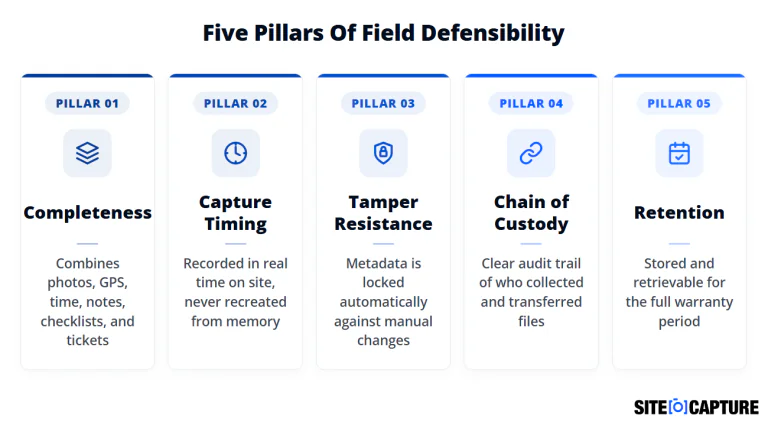
- Completeness: The record must combine all six evidence types into a single package. A photo can’t defend an entire invoice. A signed ticket can’t prove an install met safety codes.
- Capture timing: Technicians must record data on site while working. Rebuilding records from memory destroys credibility during disputes.
- Tamper resistance: Recording GPS data and timestamps is pointless if you can alter them later. Software must automatically lock time, date, and GPS coordinates. Tamper-resistant systems ensure data remains unchanged after submission.
- Chain of custody: You need a transparent audit trail showing who captured the data, what device they used, and when they uploaded it. This record confirms worker identity. It proves no one altered the files during transmission.
- Retention: Defensible records must remain accessible for years. Files must remain organized so teams can export complete packages on demand. Why? Because commercial assets carry multi-year warranties, and property disputes often surface months after tenants depart.
Where verification breaks down without software
Without dedicated software, field teams rely on manual, disconnected documentation methods. Technicians take photos on personal phones, write on paper tickets, and reconstruct details later. These habits create severe operational vulnerabilities.
Camera rolls cause frequent documentation failures:
- Native phone cameras allow users to modify dates and locations, weakening dispute defense
- Photos mix with personal files, lacking uniform names or property tags
- Technicians lose or accidentally delete key job images
Paper checklists carry significant business risk:
- Physical sheets contain no audit trail to verify when boxes were checked
- Paper forms get soiled, torn, or misplaced inside service vehicles
- Forms don’t confirm whether a technician was on site
Verification failures are widespread across many industries. For example, Dodge Construction Network research found that 98% of contractors have experienced quality defects, errors, omissions, and rework on their job sites. The study cited disconnected capture methods as a primary driver of project-level losses.
Reconstructing records from memory damages customer trust. When a client disputes an invoice weeks later, managers ask technicians to recall details. This practice yields conflicting timelines that hurt company credibility.

Documentation consistency also varies without standardized software. One technician captures thirty clear photos and notes, while another takes two blurry shots. This inconsistency prevents uniform quality control and exposes your revenue to disputes.
What verified proof of work changes downstream
Implementing field proof-of-work software transforms how your business runs once crews leave the job site. It replaces subjective arguments with verified facts.
Without Proof-of-Work Software | With Verified Proof-of-Work Software |
38-day payment dispute freezes | Immediate dispute resolution with facts |
4.8 hours/technician wasted weekly | Automated, real-time background sync |
16.2% disputed invoice rate | Disputed invoice rate drops to 3.8% |
Unstructured personal photos | Tamper-resistant digital packages |
Inconsistent crew documentation | 11.4-day faster closeouts & clear coaching |
Dispute resolution and chargebacks
Payment disputes, client pushback, and chargebacks usually stem from conflicting memories. Complete proof-of-work records resolve these arguments using objective evidence.
When a property owner claims damage or disputes scope completion, an indisputable evidence package answers the challenge immediately:
- Photos stamped with GPS coordinates and locked time markers establish exactly what happened on site
- Attaching defensible proof shuts down chargebacks before payment disputes escalate into formal claims
Faster payment and job closeout
When invoices have missing details or mistakes, getting paid takes longer and costs you money. Proof-of-work software addresses this by ensuring field crews submit complete documentation before marking a job complete.
According to the Ardent Partners State of ePayables Benchmarks, nearly 1 in 5 invoices (18.4%) has an error or missing information. Sorting out those issues delays payment approvals by over 8 days and wastes roughly $10 in office labor per bill.
Compared to companies relying on manual paperwork, businesses that use automated digital checks:
- Approve invoices roughly 80% faster
- Cut those billing mistakes in half
PoW software works because it won’t let a technician close out a job ticket until all required photos, signatures, and checklists are completed. Because the billing department gets complete proof right away, they can approve the invoice immediately without chasing down missing details.
Crew accountability and coaching
Standardized verification gives operations managers full visibility into crew performance. Centralized records show which teams follow procedures and which ones cut corners.
Managers no longer have to rely on guesswork or customer complaints to assess field workmanship. Instead, they can track completion data across technicians to identify patterns and training needs.
Objective documentation also turns tense reviews into productive coaching sessions. Supervisors can point to clear photo documentation to demonstrate correct installation, safety protocols, and cleanup standards.
Choosing a proof-of-work system for your field team
Selecting a software platform requires focusing on practical field usability. If an application adds friction to a technician’s routine, they will avoid using it.
Evaluate platforms using these criteria:
- Automatic metadata: Does the app lock GPS coordinates and timestamps in the background without manual input?
- Unified packages: Does the tool store photos, notes, checklists, and sign-offs in one job file?
- Offline reliability: Does the mobile app work in basements and remote areas without cellular service?
- Automated verification: Does the platform flag missing or blurry photos before crews leave the site?
Crews also need simple mobile workflows that allow them to complete records with minimal tapping. When software automates metadata capture, field teams can focus on quality craftsmanship instead of paperwork. A system that looks impressive on a desktop computer will fail if it burdens technicians on the job site.
SiteCaptureAI ticks all the boxes. It:
- Combines photo and video intelligence to extract critical data that technicians might have missed
- Works offline while still adding all necessary metadata like geotags and timestamps
- Inspects images in real time to ensure compliance
- It’s intuitive and easy to use
Building a proof-of-work record your team can trust
A defensible proof-of-work record isn’t a single photo or a signed sheet. It’s an organized system connecting visual proof, timestamps, and checklist data into a tamper-resistant file.
Standardizing your field verification eliminates billing disputes, speeds up cash collection, and protects your reputation. To automate quality control across every job site, schedule a SiteCaptureAI demo today.
FAQs
What counts as proof of work in field service?
Field proof of work is a complete evidence package verifying job execution. It combines before-and-after photos, locked timestamps, GPS coordinates, completed checklists, notes, and signed tickets into one record.
How is field proof-of-work software different from blockchain proof of work?
Field proof of work verifies physical job execution. In blockchain technology and cryptocurrencies, PoW is a consensus mechanism. It requires each miner and network node to compete to solve cryptographic puzzles using a secure hash algorithm (SHA-256) to:
- Earn a block reward through cryptocurrency mining
- Secure a decentralized network
- Validate transactions
- Mint new blocks
Field software uses standard cloud infrastructure to capture, organize, and centralize field records for:
- Operational verification
- QA/QC compliance